config-file route · neural model
DeepFilterNet on Linux: a neural mic filter for PipeWire, set up step by step
DeepFilterNet is the other neural denoiser on Linux, and the one people reach for when RNNoise leaves too much of a clattering kitchen behind. The project ships a LADSPA plugin, so PipeWire's filter-chain module can wrap it into a virtual microphone that every application sees as ordinary hardware. One package (or one downloaded .so), one config file, one restart. This page walks that route line by line, with the maintenance facts printed where you can check them.
If you would rather click than edit text, stop here: EasyEffects already bundles DeepFilterNet as its "Deep noise remover" effect. What follows is for people who want the model without a GUI running in their session.
main 2024-10-17; repository not archived; 67 open issues. Code dual-licensed MIT or Apache-2.0, your choice. Two years without a commit is long for a model you route your voice through, so pin the version you test and re-check before upgrading anything around it.verified against api.github.com/repos/Rikorose/DeepFilterNetWhat DeepFilterNet is, and how it differs from RNNoise
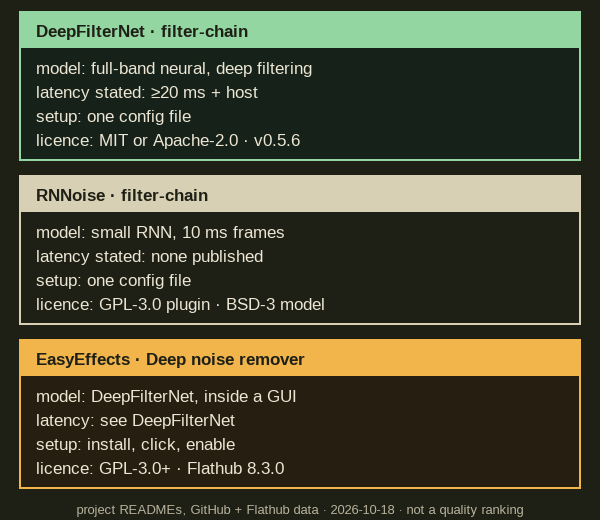
The README calls it "a low complexity speech enhancement framework for full-band audio (48kHz)" built on deep filtering. In practice it is a larger neural model than RNNoise aimed at the same job: keep the voice, drop what isn't voice. RNNoise is deliberately tiny, works on 10 ms frames at 48 kHz and has been the default inside most Linux wrappers for years. DeepFilterNet trades more computation for a model built around full-band speech. We don't publish listening scores, because we haven't run a fair test and won't invent one; the honest description is that both are speech-only denoisers and that DeepFilterNet is the heavier of the two.
| DeepFilterNet (LADSPA) | RNNoise | |
|---|---|---|
| What the project says it is | Full-band (48 kHz) speech enhancement with deep filtering | Small recurrent network for noise suppression, 48 kHz mono, 10 ms frames |
| Latency the project states | 20 ms minimum for the plugin (STFT), plus your host's own | No figure published by the project; frame size 10 ms |
| Licence | MIT or Apache-2.0 | BSD-3-Clause |
| Latest release (GitHub) | v0.5.6 · 2023-08-31 | v0.2 · 2024-04-15 |
| Last push to the repo | 2024-10-17 | 2025-02-22 |
| Easiest Linux route | EasyEffects "Deep noise remover", or this page | EasyEffects "Noise reduction", or our filter-chain page |
Both rows of dates come from GitHub's API on 18 October 2026. Neither project is archived; both move slowly, which for a finished model is less alarming than it sounds. The thing to watch is the host around them: PipeWire changes far more often than either model.
Get the LADSPA plugin
There are three honest ways to get libdeep_filter_ladspa.so onto a machine. Arch now packages it in the official extra repository as deepfilternet-ladspa 0.5.6, which installs the plugin to /usr/lib/ladspa/ and drops the project's two example configs into /usr/share/doc/deepfilternet-ladspa/examples/. Everyone else downloads the release asset for their architecture from the project's GitHub releases page, or builds it with Cargo.
~$ # Arch family: official repos (deepfilternet-ladspa 0.5.6-1)
~$ sudo pacman -S deepfilternet-ladspa

~$ # Elsewhere: the v0.5.6 release asset for x86_64
~$ # libdeep_filter_ladspa-0.5.6-x86_64-unknown-linux-gnu.so
~$ mkdir -p ~/.ladspa
~$ cp libdeep_filter_ladspa-0.5.6-x86_64-unknown-linux-gnu.so ~/.ladspa/libdeep_filter_ladspa.so

~$ # Or build it from a clone of the repository
~$ cargo build --release -p deep-filter-ladspa
The v0.5.6 release also carries aarch64 and armv7 builds of the plugin, which is useful on ARM boards. Take binaries only from the project's own releases page or your distribution; this site never links rebuilt or repackaged copies from elsewhere, and neither should a forum thread.
deepfilternet-ladspa 0.5.6-1 and deepfilternet-cli 0.5.6 are in extra; the ladspa package's database entry is dated 2026-10-06 and lists the licence as Apache-2.0 OR MIT. We did not check Debian, Ubuntu or Fedora databases for this plugin, so we say nothing about them.verified against archlinux.org/packagesThe filter-chain config, line by line
The project ships a ready config called deepfilter-mono-source.conf. Here it is, reformatted; upstream already points at /usr/lib/ladspa/, which is exactly where Arch installs the plugin. The notes underneath are ours.
context.modules = [
{ name = libpipewire-module-filter-chain
  args = {
    node.description = "DeepFilter Noise Canceling Source"
    media.name       = "DeepFilter Noise Canceling Source"
    filter.graph = {
      nodes = [
        { type   = ladspa
          name   = "DeepFilter Mono"
          plugin = /usr/lib/ladspa/libdeep_filter_ladspa.so
          label  = deep_filter_mono
          control = {
            "Attenuation Limit (dB)" 100
          }
        }
      ]
    }
    audio.rate     = 48000
    audio.position = [ MONO ]
    capture.props  = { node.passive = true }
    playback.props = { media.class = Audio/Source }
  }
}
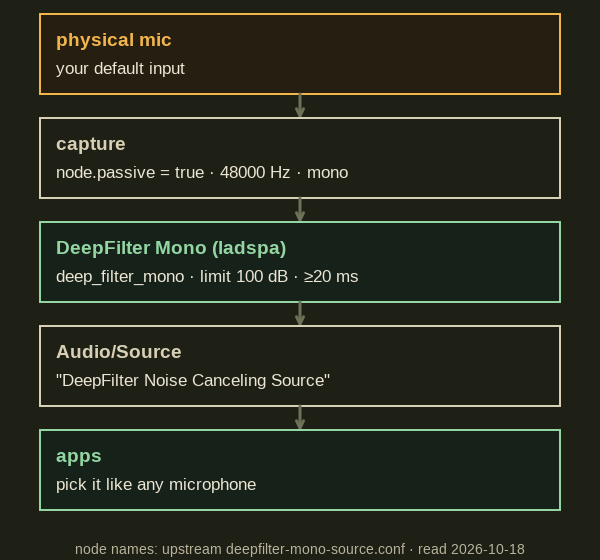
]pluginis the full path to the.so. The project's own comment is blunt about it: if the plugin sits in your home directory, write the absolute path (/home/you/.ladspa/libdeep_filter_ladspa.so) and never~or$HOME.label = deep_filter_monopicks the mono microphone variant inside the library. The project's second config uses a stereo variant to clean an output instead, such as a browser playing a noisy video."Attenuation Limit (dB)"is the one knob. 100 means no limit, so the model removes all the noise it can. Upstream suggests 6–12 for light reduction and 18–24 for medium; lower values keep some room sound, which often sounds more natural on calls.audio.rate = 48000and[ MONO ]match what the model expects.node.passive = truestops the filter from keeping your mic open when nothing is listening.media.class = Audio/Sourceis what turns the result into a microphone in every app's device list.
Load it: the project's way, or the drop-in way
Upstream's instructions run the chain as its own PipeWire process: copy the file into ~/.config/pipewire/filter-chain.conf.d/, then start it. That is perfect for a first test, because closing the terminal removes the virtual mic again.
~$ mkdir -p ~/.config/pipewire/filter-chain.conf.d
~$ cp /usr/share/doc/deepfilternet-ladspa/examples/deepfilter-mono-source.conf ~/.config/pipewire/filter-chain.conf.d/
~$ pipewire -c filter-chain.conf
~$ # debugging: more log output from the plugin
~$ RUST_LOG=DEBUG pipewire -c filter-chain.conf
For something that survives a reboot, put the same context.modules block in ~/.config/pipewire/pipewire.conf.d/ instead, so the main PipeWire daemon loads it at login, then systemctl --user restart pipewire pipewire-pulse. That is the same drop-in pattern we use for RNNoise in the filter-chain guide, and it is just as easy to undo: rename the file and restart.
Select the virtual mic, and test it
~$ wpctl status | grep -i deepfilter
~$ pw-cli ls Node | grep -i "DeepFilter"
"DeepFilter Noise Canceling Source" should appear among your sources. Choose it in your calling app, or make it the default input. Then record ten seconds of yourself typing while you talk, once on the raw mic and once on the filtered one; that comparison, done in your own room, is worth more than any number we could print. If your calling app runs its own suppression, switch it off for the test, because two denoisers in a row is the most common cause of a warbly voice (our mic-setup page lists where those hide).
Latency and CPU: what the project states
On latency the LADSPA README is specific: the plugin uses a model "without any lookahead", with a minimum latency of 20 ms from STFT processing, plus whatever latency the host adds. PipeWire's own quantum sits on top of that, so the total depends on your configuration. For conversation, that is in the range people don't notice; for monitoring your own voice in headphones, you may.
On CPU the project publishes no figure for the plugin, so we won't print one. Its second paper's title aims at "real-time speech enhancement on embedded devices", which tells you the intent, not your laptop's load. Watch it yourself with top while talking, and keep RNNoise in reserve for very old or very small machines.
When it breaks after an update
- The source vanished. Check the plugin still exists at the path in the config. A package update or a move from
~/.ladspato/usr/lib/ladspais the usual cause;ls -lthe exact path. - It loads but the log complains about the plugin. Run it in the foreground with
RUST_LOG=DEBUGas upstream suggests and read the first error, not the last. - Audio is silent. The capture side follows your default input. Make sure the default is the real microphone, not the filtered source feeding itself.
- Everything went wrong at once. Rename the drop-in to
.bakand restart PipeWire; you are back to stock audio, and can rebuild from the config above.
FAQ
Is DeepFilterNet better than RNNoise?
It is a larger model aimed at full-band speech, and many people prefer it on messy noise. We haven't measured either, so test both in your own room; switching is one line in a config or one effect in EasyEffects.
Where is libdeep_filter_ladspa.so installed?
Arch's deepfilternet-ladspa package puts it at /usr/lib/ladspa/libdeep_filter_ladspa.so. If you downloaded it, it is wherever you copied it; use that absolute path in the config.
Does DeepFilterNet work with EasyEffects?
Yes. EasyEffects lists DeepFilterNet as the engine behind its "Deep noise remover" effect, and its Flatpak includes all available plugins.
How much latency does DeepFilterNet add?
The project states a 20 ms minimum for the LADSPA plugin, plus your audio host's latency.
Is DeepFilterNet still maintained?
Its last release was v0.5.6 in August 2023 and its last commit in October 2024; the repository is not archived. Treat it as stable and slow-moving.
DeepFilterNet's source code and releases: github.com/Rikorose/DeepFilterNet.