config-file route · speakers and a mic
PipeWire echo cancellation: module-echo-cancel without the guesswork

If people on your calls hear themselves a moment after they speak, your microphone is picking up your speakers. Headphones fix that for free. When headphones aren't an option (a laptop on a desk, a room speakerphone, a kitchen tablet), PipeWire has a built-in fix: libpipewire-module-echo-cancel, which wraps the WebRTC echo canceller into a virtual microphone and a virtual speaker. It lives in PipeWire's own source tree, so it normally arrives with the PipeWire your distribution already installed.
The catch is the documentation. Search results are dominated by old copies of the module's docs, and the option names changed twice along the way, so a config that worked in 2022 can be silently ignored today. Below is a config that matches the current release, a table of what changed in which version, a way to prove it's working, and the right order when you also run a noise suppressor.
When you need echo cancellation on Linux
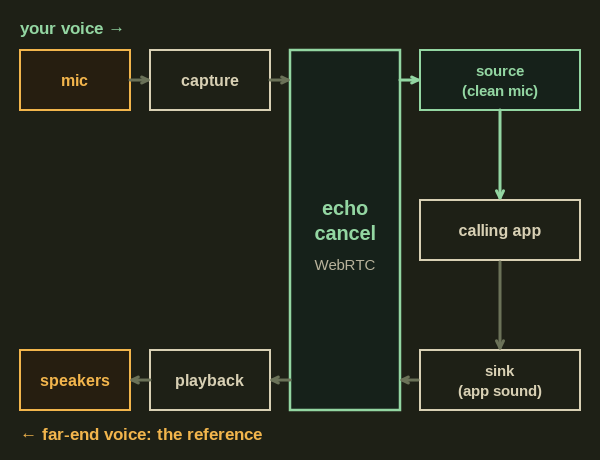
Echo is not noise. A noise suppressor such as RNNoise removes sound that doesn't look like speech; your colleague's voice coming out of your laptop speaker is speech, so a denoiser lets it straight back into the call. An echo canceller works differently: it is handed a copy of what your speakers are playing, finds that signal in your microphone, and subtracts it. That is why it needs to sit in both directions of the audio path, and why the module creates four streams instead of one.
Many calling apps and browsers already run their own echo cancellation. If yours does and the echo is gone, stop here. The module earns its place when an app has none, when several apps share one speakerphone, or when you want one consistent canceller for everything on the machine.
How the module is wired
The docs describe four streams. A capture stream reads your real microphone; a sink is where apps send the far-end audio; a playback stream passes that audio on to your real speakers; and a source exposes the cleaned microphone to apps. The canceller compares what went to the sink with what came in through the capture, and removes the overlap.
The drop-in config (current PipeWire)
Create ~/.config/pipewire/pipewire.conf.d/60-echo-cancel.conf. The node names are the ones PipeWire's own example uses, so anything you read elsewhere will match.
context.modules = [
  { name = libpipewire-module-echo-cancel
    args = {
      # library.name = aec/libspa-aec-webrtc   (the default; leave unset)
      # monitor.mode = false
      capture.props  = { node.name = "Echo Cancellation Capture" }
      source.props   = { node.name = "Echo Cancellation Source" }
      sink.props     = { node.name = "Echo Cancellation Sink" }
      playback.props = { node.name = "Echo Cancellation Playback" }
      aec.args = {
        webrtc.noise_suppression = true
        webrtc.gain_control      = false
      }
    }
  }
]~$ systemctl --user restart pipewire pipewire-pulse
~$ wpctl status | grep -i "echo cancellation"Three settings deserve a sentence each. library.name picks the canceller; the only one the docs list is aec/libspa-aec-webrtc, which is also the default, so you can leave it commented. aec.args passes options straight to WebRTC: in 1.6.9's source, its own noise suppression and high-pass filter default to on and automatic gain control defaults to off, with a code comment saying AGC "seems to mess up" delay detection. And monitor.mode, when true, skips the virtual sink and listens to the monitor of your default speaker instead, which helps when apps refuse to send audio anywhere but the default output.
Option names across versions
This is where most broken configs come from. We read the module's built-in documentation at each tagged release on GitHub's mirror of the PipeWire repository; the table records the first tag where each change appears.
| PipeWire version | What the module accepts | If your config is older |
|---|---|---|
| 0.3.45 and earlier | aec.method = webrtc to choose the canceller; source.props and sink.props only | Fine on old systems; ignored by newer ones |
| 0.3.46 | aec.method replaced by library.name | Rename the key; the old one does nothing |
| 0.3.49 | Docs name aec/libspa-aec-webrtc as the default library (0.3.46–0.3.48 docs named an exaudio value) | Leave library.name unset and let the default apply |
| 0.3.64 | capture.props and playback.props honoured | Below this, you can't steer the hardware-facing streams from config |
| 0.3.65 | monitor.mode documented (the code has read it since 0.3.60) | Before 0.3.60 the module always creates the virtual sink |
| 1.6.9 (current) | All of the above, unchanged | Use the config on this page |
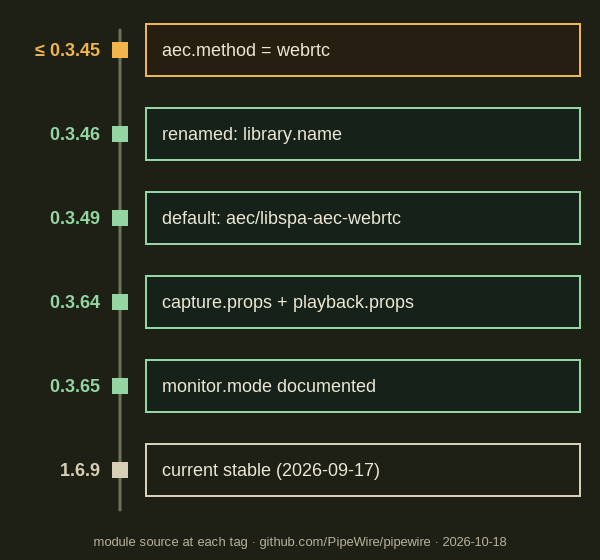
The 0.3.64 change has a paper trail. GitLab issue 2939, opened on 7 January 2023 against 0.3.63, reported that the module "completely ignores" capture.props and playback.props, so its streams always latched onto the default devices. The issue was closed on 16 January 2023, and the next tag documents both properties.
Verify the nodes and links
~$ # the two virtual devices should exist
~$ wpctl status
~$ # make them the defaults (use the IDs wpctl printed)
~$ wpctl set-default <id-of-Echo-Cancellation-Source>
~$ wpctl set-default <id-of-Echo-Cancellation-Sink>
~$ # see what is actually connected to what
~$ pw-link -l
Then test the thing you care about. Play something with speech through your speakers, and record ten seconds from the cleaned source with pw-record --target "Echo Cancellation Source" test.wav while you talk over it. Play test.wav back: your voice should be there and the speaker audio should be mostly gone. If the speaker audio is untouched, the app's sound isn't going through the Echo Cancellation Sink, so the canceller never saw the reference. Make the sink the default output, or switch monitor.mode on.
Multichannel interfaces: steering and pw-link
On a USB interface with several inputs, the capture stream may pick the wrong channel or all of them. From 0.3.64 you can steer it in config: add PipeWire's standard target.object property to capture.props, set to your interface's node.name from wpctl inspect. If the channel mapping is still wrong, fix the wiring by hand: list ports with pw-link -o and pw-link -i, remove the automatic link with pw-link -d, and link the input channel your mic is actually on to the echo-cancel capture's input. Manual links don't survive a restart, so once you know the right pairing, move it into config or a session-manager rule.
Echo cancel plus noise suppression: the order of filters
Put the echo canceller first and the noise suppressor after it. The canceller works by matching your speaker signal inside your microphone signal; a neural denoiser in front of it reshapes the microphone audio and makes that match worse. Our reasoning, not a measurement, but it is how the module's own docs draw the path: mic in, cancel, then out to apps. In practice, point your RNNoise or DeepFilterNet filter-chain's capture side at "Echo Cancellation Source" instead of the raw microphone.
Because WebRTC already runs its own noise suppression by default, set webrtc.noise_suppression = false in aec.args when you add a dedicated denoiser after it. Two suppressors in a row is the classic recipe for a warbly voice, as our mic-setup page explains.
FAQ
Does PipeWire have echo cancellation built in?
Yes: libpipewire-module-echo-cancel, which uses the WebRTC canceller by default. You enable it with a small config file; it isn't loaded out of the box.
Why does my echo-cancel config do nothing?
Usually an old key (aec.method instead of library.name) or app audio that bypasses the Echo Cancellation Sink. Check the version table, then make the sink your default output.
Is aec.method still valid?
No. From PipeWire 0.3.46 the module documents library.name instead, and the current default is aec/libspa-aec-webrtc.
Can I use echo cancellation with RNNoise or DeepFilterNet?
Yes: run echo cancellation first, feed its source into the denoiser, and switch off WebRTC's own noise suppression so the voice isn't processed twice.
Do I need echo cancellation with headphones?
No. With headphones the far-end audio never reaches your microphone, so there is no echo to remove.
PipeWire's documentation for the echo-cancel module: docs.pipewire.org, Echo Cancel.